Family Historian Features - What's New in Version 8
Ref: CPFH8-NF
Continued
Next Level Sources & Citations
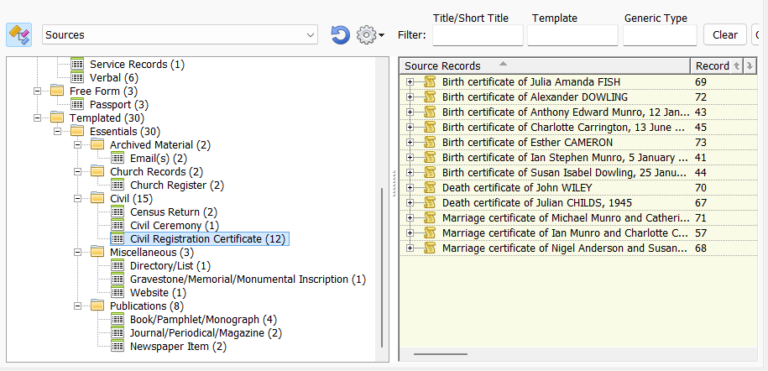
- As mentioned above, Smart Folders offer great benefits in all contexts. But they are particularly useful for organising and displaying information about sources and citations. You can have whatever kind of organisational structure you want (see example, right). If you use source templates, the standard folder set for Source records will automatically generate Smart Folders that reflect the structure and content of your source templates – including any custom source templates of your own. Each Smart Folder can have its own set of content-specific columns. This again is particularly useful when dealing with sources, where the type of stored information can vary considerably.
- Previously Family Historian has supported two types of Source record: generic and templated. There is now a third type: free form. Free form sources allow sources and citations to be simply entered in an unstructured way as text, using bold, italics and underline where needed.
- All source citations, of all types, can now be fully customised in the Citation Window.
- The Bibliography section of reports and books has also been improved and made more flexible. Now you can customise a bibliography entry at the Source record level, and at the citation level. Where previously it just generated an entry for each Source record, now the Bibliography section looks at the complete list of generated bibliography entries and effectively merges all identical entries. This means that lumpers can have multiple bibliography entries for a single source, if they wish to (by associating different bibliography entries with different citations), and splitters can allow multiple Source records to share a single bibliography entry if they wish to do that (see terminology note below).
- Family Historian 8 introduces a new “prioritize compatibility” export option, which exports full details of source citations using standard GEDCOM fields – so any program can import them, whatever your source type. This matters because GEDCOM (the standard format for shared genealogy data) doesn’t natively support source templates, free form sources, or customised citations, so those details could otherwise be lost when exporting to another program. The new option works with all source types – generic, free form or templated, customised or not.
Terminology: In the genealogy world, a ‘splitter’ is a genealogist who favours having many, detailed Source records to represent real-world sources, where a ‘lumper’ prefers a small number of large-scope Source records. For example, a splitter might have one Source record for each census entry in a particular census, where a lumper might have one Source record for the entire census. Most genealogists are a mixture of the two.
Diagram Enhancements
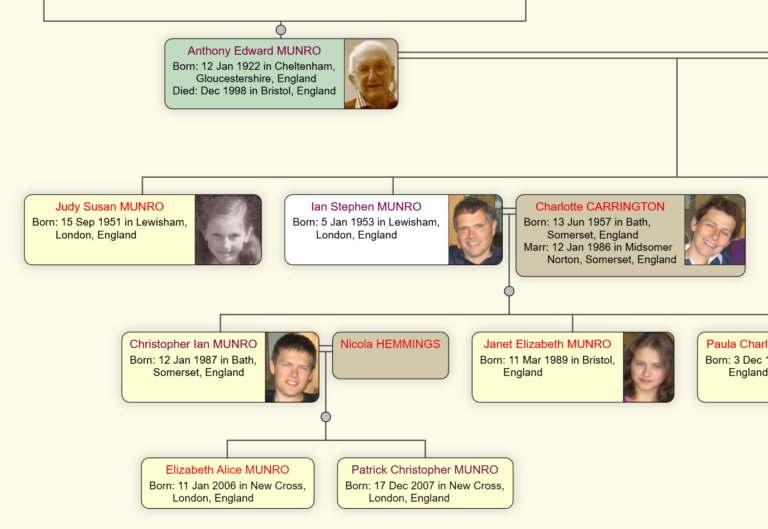
- Graphics update: The underlying graphics engine has been completely reworked with new technology that features faster display of diagrams, and improvements to their appearance. The new technology supports ‘hardware-acceleration’ which means that it takes advantage of underlying graphics hardware (GPU) to deliver optimum performance.
- There have been improvements to numerous features of diagrams. For example, there are new display effects for diagram boxes, you can now create your own custom presets for box appearance, there have been improvements to the design of fan charts and pedigree charts, and you now have full undo/redo to all edits with diagram ‘shapes’ (text boxes, polygons, lines, and so on).
- Standard diagrams have been given a new look, incorporating some of the new display features. But you still have easy access to the old look, if desired.
- Diagrams now work much better with books (see Better Books, next).
Better Books
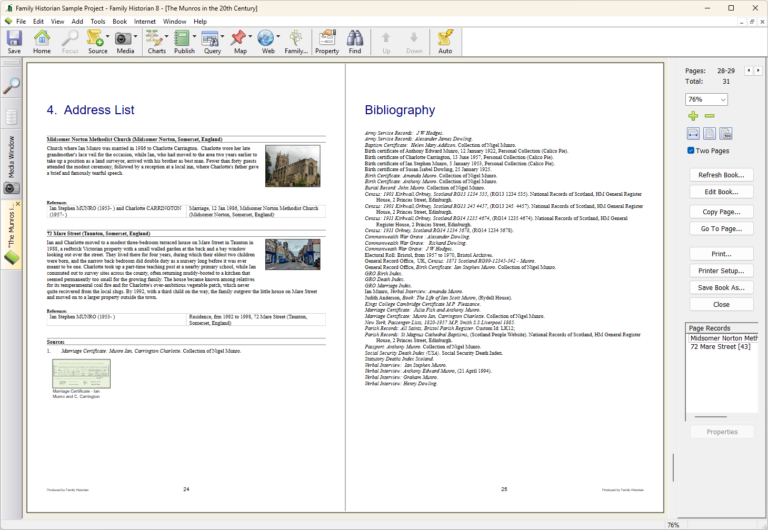
- Books can now have “Address List” and “Place List” sections to provide pictures and descriptions of the addresses and places mentioned in the book.
- There is a new “Pedigree Chart (as booklet)” report. This creates the report as a booklet. You can also now add a pedigree chart to any book. You can revise the pedigree chart options as required at any time (not just when adding the chart to the book).
- There is much improved support for integrating diagrams with books. You can now edit a diagram even after it has been added to a book. A new feature called “book layout compatibility” ensures that the page layout of charts or diagrams is kept compatible with a given book, so that multi-page diagrams fit perfectly into a given book, regardless of how many pages they use. So, for example, a 5-page diagram will take up exactly 5 book pages. This compatibility is automatically maintained with charts and diagrams that have been added to a book; but even with diagrams or charts that have not yet been inserted into a book, you can adjust their page layout to ensure compatibility with any given book.
- You can now easily create a scrapbook or photo book, using images and text that you put together yourself. The scrapbook or photo book can be an entire book, or a section of a book. The Windows snipping tool (now accessible from the Tools menu) allows you to quickly snip parts of a chart, diagram or map. These can be added to a project as a Media record or inserted directly into a scrapbook.
- As mentioned above (see Next Level Sources & Citations), the Bibliography section of books (and reports) has been improved and made more flexible.
- Book indices now index the people in all charts, including tree diagrams, fan charts, pedigree charts etc.
64-bit Architecture
- Family Historian 8 can now handle much larger projects, and much larger reports, books, diagrams and charts, thanks to a new 64-bit architecture. It also means significant performance improvements in many cases, especially with large projects.
- Backups have also been enhanced to remove previous size limitations.
- Family Historian 8 requires a 64-bit version of Windows. Almost all modern Windows computers are 64-bit. To check yours, go to Settings > System > About and look at System type.
Support for Non-Family Relationships
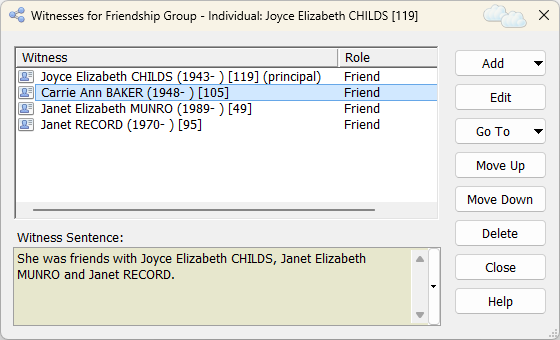
- Family Historian has long supported witnesses – that is, non-principal participants in an event, such as the best man at a marriage or a beneficiary to a will. That support has been extended and made even more powerful. The new functionality makes it possible to easily record relationships of any kind. For example, the program now has built-in support for friend lists (a list of all of a person’s friends), friendship groups (a group of people who were all friends of one another), and enslavement facts – each of which is a record of one or more people who were enslaved, and optionally also the person or persons who enslaved them.
- Create your own custom relationships of any kind. These can be one-to-one relationships (something like a marriage), one-to-many relationships (teacher and pupils, say), or many-to-many relationships (friendship groups or enslavement); and the parties can have the same or different roles, as required.
LDS Church Support
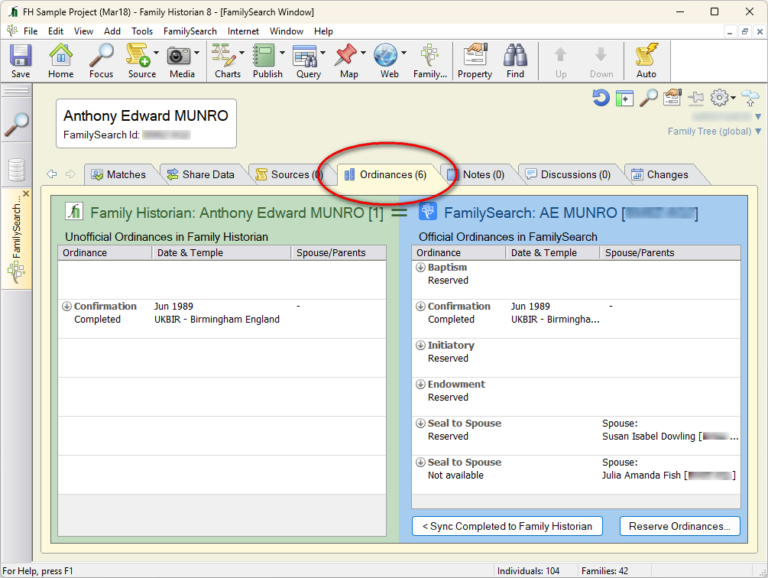
- Family Historian now has extensive features to meet the needs of members of the Church of Jesus Christ of Latter-Day Saints. These features are normally hidden (they only have relevance to LDS Church members) but are enabled by an option in Preferences.
- The new features include support for recording LDS Ordinances. Like any other data, this information can be included in reports, books, charts or websites, and explored and analysed using queries
- When LDS Church support is enabled, the new FamilySearch workspace window has an additional Ordinances tab (see image) for managing integration with FamilySearch with respect to ordinances.